Could your tracking setup be making Google Ads look worse than it is?
How cookie consent can affect Google Ads reporting, what missing leads do to your cost per enquiry, and how to fix it.
 Dan Courtis
Say you’ve spent $2,000 on Google Ads this month. The campaign’s cost per enquiry isn’t as strong as you’d like, but the business has had more enquiries than the report suggests. Before I start changing bids or rewriting ads, I want to know what happened to those enquiries. Did they come from Ads in the first place? And if they did, did Google record them?
Cookie consent is an essential piece of the puzzle. I’ve seen client sites where analytics consent starts denied and stays that way because there’s no banner or other mechanism to update it. The tags can still appear to fire when you test them. If you stop your check there, it’s easy to miss what’s happening further down the line.
What eight missing leads do to your numbers
Let’s say you can verify that all 20 enquiries in this example came from Google Ads. Google Ads only reports 12.
| What the campaign generated | What Google Ads reported | |
|---|---|---|
| Ad spend | $2,000 | $2,000 |
| Enquiries | 20 | 12 |
| Cost per enquiry | $100 | $167 |
That’s 40% of leads missing from the report, which makes the reported cost per enquiry about 67% higher. If you’re deciding which campaign to put more money into, that’s a pretty big difference.
I’ve picked those numbers to show the maths. In practice, when visitors decline cookies, Google Ads can lose the link between an ad click and an enquiry. How many conversions go unobserved depends on how many of those visitors actually enquire.
In Google’s worked example, half the visitors declined consent, and that group accounted for 12 of the 62 conversions. So whilst 50% of visitors declined, about 19% of conversions went unobserved before modelling. That’s still roughly one in five. If your reporting misses that share of enquiries, you could end up cutting the budget on a campaign that’s actually meeting its target. Google Ads’ worked example
What happens when you accept analytics on my site?
I’ll use my own site to show how the browser setup works. On a fresh visit, analytics consent starts denied. If you open the cookie preferences, allow Analytics and save, the site updates that state to granted. Google Analytics can then use analytics cookies, and the site remembers your choice on the next page. If you reject optional cookies, analytics storage stays denied. You can change your choice later through Cookie settings.
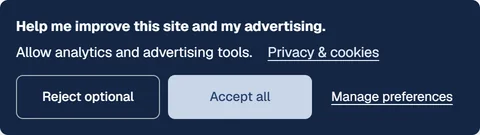
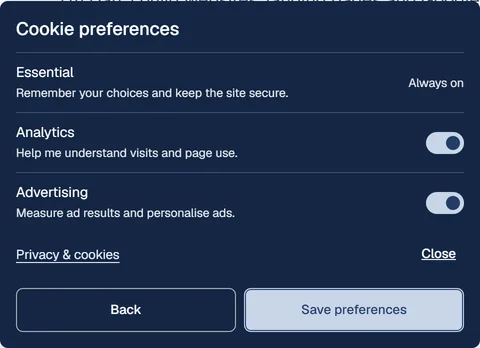
Here are the consent states side by side in the flow. The first two figures show denied defaults and an analytics-only choice. Accept all also grants the three advertising permissions in this setup.
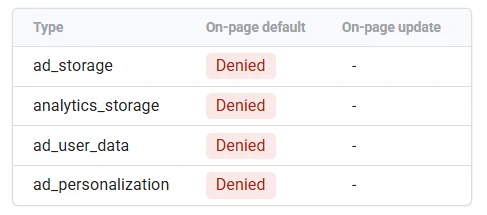
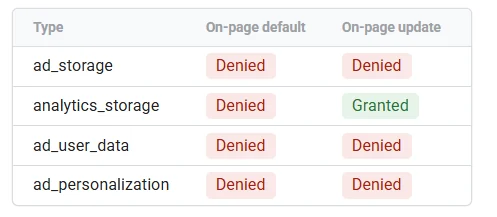
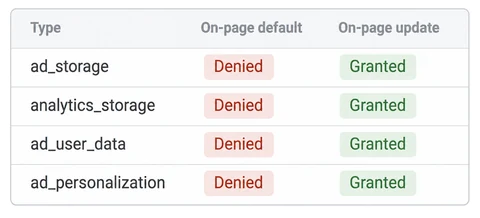
The issue I’ve seen on client sites is that analytics & ads permissions start denied and there’s no way for a visitor to change it. That initial Denied setting is expected. Someone can click an ad and send an enquiry, but with advertising cookies denied throughout the visit, Google Ads may have less information to link that enquiry back to the ad.
What those consent settings control
| Setting | What it controls |
|---|---|
| Analytics storage | Whether Google tags can read or write analytics cookies. |
| Advertising storage | Whether Google tags can use advertising cookies, including for attribution. |
| Advertising user data | Whether user data can be sent to Google for advertising purposes. |
| Advertising personalisation | Whether data can be used for personalised ads, including remarketing. |
Remembering a visitor’s cookie choice is a separate function. It lets the site respect that choice without asking again on every page. Google’s consent settings reference
The other thing to check is which version of Consent Mode the site uses. In Basic mode, Google measurement tags are blocked until permission is granted. In Advanced mode, supported Google tags can load and send limited cookieless measurements whilst storage is denied. That’s how you can see a tag fire and still have gaps in what you can observe in your reports. It’s also why I’d check that the privacy policy describes what the site actually sends. Google’s guide to Basic and Advanced Consent Mode
I work with a lot of New Zealand businesses, but these tracking checks apply wherever you’re based. Start with what your site collects, why you collect it and what you tell visitors. For NZ businesses, the Privacy Commissioner’s guidance is a good starting point. Where your visitors are based matters too. Google’s EU user consent policy applies to visitors in the regions it covers, including when they visit a New Zealand website.
NZ Privacy Commissioner’s collection guidance · Google’s regional consent policy guidance
How much can Google fill in?
Google Ads can estimate some conversions it can’t directly attribute. GA4 can estimate how visitors who decline analytics use your site. Both need enough data before modelling kicks in, and they measure that in different ways.
| Modelling | What Google requires |
|---|---|
| Google Ads conversions | 700 ad clicks over seven days per country and domain grouping, with consent set up correctly. |
| GA4: consent denied | 1,000 events a day for at least seven days. |
| GA4: consent granted | 1,000 users a day sending events on at least seven of the past 28 days. |
GA4 behavioural modelling requires Advanced Consent Mode across the site and both GA4 thresholds above.
The GA4 distinction matters. One person can trigger several events, so you might reach 1,000 denied events in a day and still be well short of 1,000 users who granted analytics consent. Google can also need more data before it has enough confidence in the model.
Google Ads conversion modelling requirements · GA4 behavioural modelling requirements
Google reported a 9% uplift in conversions across Air France’s European markets after it implemented Consent Mode. That gives you an example of what modelling can add to reporting when there’s enough data. Google’s Air France case study
Does server-side tagging solve this?
Server-side tagging gives you more control over how measurement data is processed and sent to Google. The server still needs to respect the visitor’s choice. If the website never applies that choice, changing the route the event takes won’t fix the missing consent update. I’ll cover server-side tracking and when it’s worth setting up in a separate article. Google’s server-side consent guidance